Digital distractions are a major challenge for modern remote work, but overcorrecting with strict productivity tools can be just as damaging as the distractions themselves. Many remote workers attempt to block every website and app aggressively, only to find themselves stressed, frustrated, or creatively stifled.
Understanding how to use StayFocusd effectively without triggering burnout is about balance: protecting focus while preserving autonomy, motivation, and mental energy.
Table of Contents
How StayFocusd Is Commonly Misused
Many users approach StayFocusd with an all-or-nothing mindset, believing that total restriction equals maximum productivity. While this can produce short-term results, it often leads to stress, resentment, or counterproductive behavior.
Common Patterns of Misuse
- Overly Aggressive Time Limits
Setting minimal daily allowances for social media or leisure sites may seem logical, but it can generate frustration and frequent work interruptions. Users may feel punished for natural breaks, leading to tension that undermines focus rather than supporting it. - Overreliance on the Nuclear Option
Engaging the Nuclear Option repeatedly as a default strategy removes choice entirely. While it guarantees a distraction-free environment, it also reduces intrinsic motivation and can create a rebound effect, where users binge content once restrictions end. - Ignoring Work Flow Needs
Blocking websites without considering work tasks can backfire. Some research or collaboration platforms may be mistakenly restricted, causing workflow interruptions and additional stress. - Skipping Gradual Habit-Building
Expecting instant behavior change is common. Users often set extreme rules without accompanying strategies for building sustainable focus, which can result in burnout within days or weeks.
What Effective Use Actually Looks Like
Balanced StayFocusd usage prioritizes sustainable focus, autonomy, and mental well-being. The goal is not to eliminate all distractions but to strategically manage them in alignment with energy levels, work rhythm, and real-world deadlines.
Principles of Effective Use
- Flexibility Over Rigidity
Configure site restrictions based on time of day and task type. For example, block social media heavily during deep work sessions but allow moderate access for breaks or inspiration. - Gradual Adjustment
Begin with moderate limits and adjust based on observed behavior. Incrementally tightening restrictions allows the mind to adapt and reduces stress associated with abrupt deprivation. - Alignment With Goals
Customize blocked and allowed sites according to specific work objectives. Keep frequently used work platforms unrestricted while limiting known distraction sources. - Mindful Breaks
Incorporate short, intentional breaks where browsing is allowed. This prevents feelings of punishment and supports sustained attention throughout the day. - Routine and Planning Integration
Integrate StayFocusd usage into existing work schedules, such as the Pomodoro technique or timeblocking. Effective implementation considers natural energy peaks and troughs to maximize productivity without overtaxing mental resources.
Step-by-Step Setup Guidance
Setting up StayFocusd for effective, burnout-aware productivity involves clear planning, thoughtful configuration, and periodic review:
- Install the Extension
Download StayFocusd from the Chrome Web Store and add it to your browser. Ensure it has proper permissions to control the sites you want to manage. - Identify Distraction Sites
List websites and apps that consistently derail focus. Prioritize high-distraction sites first, keeping work-critical platforms unrestricted. - Set Daily Allowances
Assign reasonable time limits for each site. Start conservatively rather than overly strict; the aim is to nudge behavior, not provoke stress. - Configure Nuclear Option or Active Days
Reserve extreme lockdowns for specific high-stakes tasks or deadlines, rather than using them as a default. Activate only when a concentrated work sprint is planned. - Review and Adjust Weekly
Track your focus patterns, assess where rules may be too strict or too lenient, and adjust daily allowances or blocked sites accordingly.
Aggressive vs Balanced Configurations
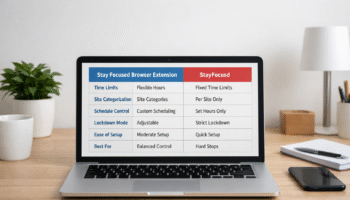
| Configuration Type | Description | Benefits | Risks |
|---|---|---|---|
| Aggressive | Minimal daily allowances, frequent Nuclear Option usage, blanket site blocks | Short-term productivity spikes | High stress, burnout, rebound browsing, reduced autonomy |
| Balanced | Moderate allowances, selective blocking, scheduled extreme locks for key tasks | Sustainable focus, supports breaks, promotes autonomy | Slower initial behavior change, requires self-monitoring |
Effective configurations focus on steady improvements rather than immediate perfection. Overly aggressive settings may feel productive but often erode mental resilience, while balanced setups maintain attention without exhausting cognitive resources.
This approach helps remote workers maintain attention, prevent burnout, and integrate focus tools as part of a broader productivity strategy rather than as punitive measures.
Sustainable Focus Strategies
Maintaining productivity without burnout requires approaches that extend beyond software limitations. Sustainable focus strategies emphasize managing energy, attention, and environment alongside tools like StayFocusd.
- Timeblocking for Deep Work
Plan blocks of uninterrupted work aligned with natural energy peaks. StayFocusd can enforce boundaries during these periods, but the schedule itself guides realistic output expectations. - Intentional Breaks
Short, mindful breaks support cognitive recovery and prevent fatigue. Allowing controlled access to leisure sites or apps during these intervals preserves balance without compromising attention. - Task Prioritization
Use to-do lists or project boards to identify high-priority tasks. Focused work on essential tasks reduces reliance on extreme browser restrictions, ensuring that energy is spent on meaningful outcomes. - Digital Environment Optimization
Close unnecessary tabs, mute non-essential notifications, and maintain a clutter-free workspace. These environmental adjustments reduce cognitive load and complement StayFocusd’s blocking capabilities. - Reflection and Adjustment
Weekly reviews of focus patterns, task completion, and tool usage provide insight into effectiveness and mental well-being. Adjust site allowances or work periods to prevent over-restriction and support long-term productivity.
Signs Your Settings Are Too Restrictive
Overly strict configurations can undermine both focus and well-being. Key indicators include:
- Stress or anxiety during blocked periods
- Frequent attempts to bypass or deactivate the extension
- Frustration interfering with work flow or creativity
- Rebound behavior once restrictions lift
- Feeling punished rather than supported by the tool
When these signs appear, it is often a cue to moderate limits, introduce intentional breaks, or pair StayFocusd with task-based planning rather than relying on raw restriction.
Mindful Productivity Habits to Pair With StayFocusd
StayFocusd is most effective when combined with mindful habits that strengthen internal focus:
- Single-tasking: Concentrate on one task at a time rather than toggling between multiple tabs or projects.
- Pomodoro or Focus Sprints: Use 25–50 minute work periods with short breaks to maintain attention without mental fatigue.
- Reflection Journals: Note distractions, emotional triggers, and peak performance times to inform future adjustments.
- Physical Reset: Stretching, walking, or brief movement helps reset mental energy and complements digital focus periods.
- Intentional Screen Use: Treat leisure browsing as a planned activity rather than a reward for avoiding work, reinforcing autonomy and control.
Conclusion
Using StayFocusd effectively is less about extreme restriction and more about balance, intention, and self-awareness. Sustainable productivity emerges from integrating software tools with mindful habits, task planning, and energy management. Properly configured, StayFocusd can prevent distraction while supporting autonomy, mental resilience, and consistent focus.
Burnout is minimized when users combine strategic site blocking with reflective practices, intentional breaks, and realistic goal-setting. Productivity is most durable when it respects human cognitive limits.
Frequently Asked Questions
How do I know if my StayFocusd settings are too strict?
Signs of over-restriction include stress during blocks, frequent bypass attempts, frustration with normal workflows, and rebound behavior after restrictions end. If blocked sites interfere with work or mental well-being, it may be necessary to moderate limits and introduce planned breaks.
Can StayFocusd replace other focus strategies?
StayFocusd is a supportive tool rather than a standalone solution. Combining it with timeblocking, task prioritization, and mindful breaks ensures that focus is sustained without reliance on extreme restrictions. Using it in isolation may create temporary gains but risks burnout.
How long should focus sessions last?
Focus sessions typically range from 25 to 90 minutes, depending on task complexity and energy levels. Shorter sessions reduce fatigue and maintain attention, while longer sessions can be effective when paired with intentional breaks and mental preparation.
Is the Stayfocusd Nuclear Option necessary for all users?
No. The Nuclear Option should be reserved for short, high-stakes tasks that require complete focus. Regular use can undermine autonomy, create stress, and encourage rebound browsing. Moderate, flexible settings are sufficient for most productivity goals.
How can I integrate StayFocusd into a daily routine?
Align StayFocusd blocks with natural work rhythms, peak energy periods, and task priorities. Pair with timeblocking, Pomodoro sessions, and scheduled breaks. Weekly reviews help fine-tune limits for effectiveness without causing fatigue or frustration.
What are alternatives if StayFocusd feels restrictive?
Gradual limits, task-based focus sessions, environmental adjustments, and mindful tech practices can achieve sustained attention. These methods build intrinsic focus skills, reduce dependence on software, and prevent burnout associated with extreme restrictions.
Further Reading
- The Science of Focus: A recent evidence‑based guide to rebuilding attention span with strategies like mindfulness and digital hygiene — great for grounding the psychology discussion. The Science of Focus: Rebuild Your Attention Span
- Pomodoro Technique (Wikipedia): Authoritative explanation of this time management method, which is a strong alternative to extreme blocking strategies. Pomodoro Technique Overview
- Timeblocking (Wikipedia): A well‑established productivity technique that complements tools like StayFocusd without the downsides of full lockdown modes. Timeblocking Productivity Technique