In our increasingly digital workspaces, staying focused has become more challenging than ever. With social media notifications, endless tabs, and streaming distractions just a click away, the need for tools that genuinely help maintain attention is clear.
Focused browser extensions have emerged as practical solutions, designed to limit distractions, streamline online tasks, and foster deep work. But not all extensions live up to their promises—some add more friction than value, while others quietly track your activity without improving productivity.
In 2026, choosing the right tool requires understanding both the psychology of focus and the evolving capabilities of modern browsers.
Table of Contents
What Makes a Browser Extension Effective
A browser extension can claim to “boost focus,” but the real test lies in its design and alignment with human attention patterns. Effective extensions share several key traits that make them genuinely helpful:
1. Minimal Cognitive Load
An effective extension simplifies your decisions. Rather than presenting endless settings, it offers clear choices: block, allow, or schedule access. For example, extensions like Forest use gamified timers that require almost no conscious effort to set up but provide immediate feedback on progress, reinforcing sustained focus.
2. Customization That Matches Real Workflows
People’s attention patterns differ depending on tasks. Some need full isolation, while others benefit from limited, structured browsing. High-quality focus extensions let users tailor block lists, work intervals, and reward systems, accommodating both short sprints and extended deep work sessions.
3. Transparent Permissions and Privacy
A productive extension doesn’t hide what it can access. Users in 2026 are more privacy-conscious, often looking for open-source or verified extensions with minimal data collection. An effective tool will clearly indicate whether it tracks websites visited, time spent, or personal identifiers—and offer an opt-out.
4. Integration With Modern Work Tools
Many productive workflows rely on web-based apps. Extensions that integrate with Google Workspace, Microsoft 365, or Slack reminders help maintain attention without forcing users to leave their task environment. Tools that sync focus sessions across devices are particularly valuable for hybrid remote work.
5. Real-Time, Actionable Feedback
Simply blocking websites isn’t always enough. Leading extensions provide insights: time spent on focus versus distraction, streaks of productive sessions, or gentle nudges when attention drifts. These micro-feedback loops help reinforce behavioral changes without inducing stress.
Why Many Focus Tools Fail
Despite the proliferation of browser extensions, many users report limited improvement in concentration.
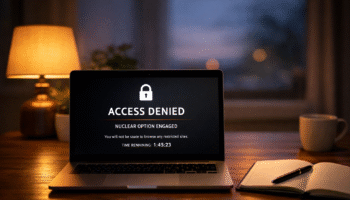
Extensions that are too strict can sometimes backfire. For instance, using the StayFocusd nuclear option can completely lock access to sites, which is helpful for some users but may trigger frustration if applied without careful planning
Understanding why some tools fail can help you avoid wasted time and frustration.
1. Overly Restrictive Features
Extensions that block too much or lock users out completely can trigger anxiety or resistance. In practice, too rigid a system often leads to workarounds, like switching browsers, using incognito modes, or mentally rebelling against the tool’s limitations.
2. Lack of Personalization
A “one-size-fits-all” approach ignores individual work habits. Some users thrive with time-blocked interruptions, while others need gradual distraction reduction. Without the ability to adjust rules or timing, extensions become more of a nuisance than an aid.
3. Ignoring Multitasking Realities
Modern work often requires hopping between tabs and apps. Extensions that indiscriminately block sites without context fail to recognize productive multitasking. For example, a student researching for a report may find a blocklist that includes social media research sources ironically reducing efficiency.
4. Poor User Experience
Clunky interfaces, confusing settings, or frequent bugs can break concentration rather than improve it. An extension should fade into the background, operating smoothly in the workflow without adding friction.
5. False Sense of Productivity
Some extensions provide gamified streaks or alerts but fail to address core distractions. Users may feel they are focusing while their attention still drifts, creating an illusion of productivity. Real gains require measurable behavioral changes, not just app metrics.

Popular Focused Browser Extensions in 2026
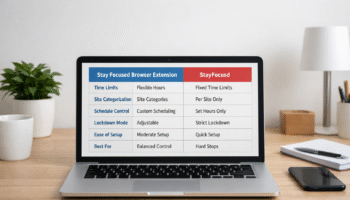
To help navigate the crowded market of productivity tools, the table below compares the leading focused browser extensions currently used by remote workers, students, and knowledge professionals in 2026. The evaluation includes effectiveness, customization, privacy, and integration.
For users who prefer a simple setup without excessive options, extensions like Mindful Web or Forest are often considered the best focus extension for minimalists. These tools keep the interface clean while still supporting productive workflows.”
| Extension | Main Focus | Customization Options | Privacy & Permissions | Integration Features | Ideal For |
|---|---|---|---|---|---|
| StayFocusd | Time-limited site blocking | Customizable blocklists, nuclear mode | Minimal tracking, optional data sharing | Works across Chrome ecosystem | Users needing strict time control |
| Forest | Gamified focus sessions | Set timers, plant virtual trees | Offline-first, no tracking | Sync across devices | Gamified focus seekers |
| LeechBlock NG | Highly granular blocking | Advanced rules, schedules, regex | Local storage only | Works on multiple browsers | Users needing precise control |
| Freedom | Cross-device distraction control | Block apps/websites, schedule sessions | Encrypted sync, transparent policies | Desktop & mobile integration | Professionals needing device-wide focus |
| Mindful Web | Gentle nudges & reminders | Adjustable nudges, weekly reports | Minimal tracking, opt-out | Google Workspace, Slack reminders | Users building awareness habits |
This comparison highlights how modern focus tools differ not just in blocking capability, but in workflow integration, personalization, and user experience. Choosing the right extension depends on your work style, attention needs, and tolerance for rigidity.
Realistic Expectations for Focus Tools
No extension can magically create focus. Their role is to provide structure and reduce friction around attention. Expect incremental gains rather than overnight transformation. Some days, you may drift despite blocks; other days, you may experience heightened concentration. Combining extensions with disciplined routines—like Pomodoro cycles, morning planning, and regular breaks—ensures a practical, sustainable approach to productivity.
Before committing to a tool, it’s helpful to understand its boundaries. Reviewing the Stay Focused extension features and limits can guide users in setting realistic rules that match their workflow without causing unnecessary stress.
How to Test Effectiveness Personally
Testing focus tools is about observing your behavior over time, not chasing metrics alone. Try these steps:
- Baseline Your Attention: Track how long you focus on a task without any extension.
- Implement One Tool at a Time: Avoid stacking multiple extensions at once.
- Set Clear Goals: Decide whether the goal is reducing social media, improving deep work, or maintaining streaks.
- Observe Changes: Take notes on task completion, stress levels, and distraction frequency.
- Adjust Rules: Tweak settings to match real-life needs, avoiding overly rigid blocking.
Consistency over a few weeks provides a clearer picture than short-term spikes in focus.
Long-Term Focus Strategies Beyond Extensions
Browser extensions can help, but lasting attention improvement relies on broader habits:
- Structured Work Routines: Use consistent start times, time-blocking, and task prioritization.
- Digital Hygiene: Limit unnecessary notifications across devices, keep browser tabs minimal, and archive irrelevant emails.
- Mindfulness Practices: Brief meditation or focus exercises help train attention control beyond the digital workspace.
- Physical Environment Optimization: Light, ergonomics, and minimal clutter reduce cognitive friction.
- Accountability Systems: Share goals with a colleague, friend, or team to reinforce behavioral change.
Extensions work best as part of a comprehensive attention strategy rather than a standalone solution.
Conclusion
So, is a focused browser extension the key to productivity? Here’s our final thoughts on the matter. Extensions like StayFocusd, Forest, LeechBlock NG, Freedom, and Mindful Web can meaningfully reduce digital distractions when used thoughtfully.
The best results come from combining these tools with realistic expectations, personal experimentation, and long-term attention-building habits. They are aids, not magic bullets—helpful guides to keep your focus aligned with the demands of modern work life.
FAQ
1. Can focused browser extensions replace self-discipline?
No. Extensions help create structure, but self-discipline remains essential. They work best when paired with personal routines, time-blocking, and mindful strategies. Without conscious effort, tools alone won’t sustain deep work habits over the long term.
2. Are there risks to using multiple extensions?
Yes. Installing several focus extensions simultaneously can cause conflicts, slow browsers, or create overlapping block rules that disrupt workflow. Start with one tool, evaluate effectiveness, then consider adding additional extensions gradually.
3. How often should I review extension settings?
At least once a month. Attention needs and work demands shift over time. Reviewing settings ensures rules remain practical, prevents over-restriction, and maintains alignment with current tasks and productivity goals.
4. Do focus extensions track my data?
It depends on the extension. Many modern tools prioritize privacy and offer offline-first operation. Always check permissions and privacy policies. Choose tools with minimal tracking and transparent data practices, especially if using multiple devices.
5. Can focus extensions help with multitasking?
Yes, if configured thoughtfully. Extensions that allow selective site access or scheduled blocks support productive multitasking. Overly rigid tools, however, may hinder workflows that require switching between research, communication, and task management.
6. How long before I notice improvements?
It varies, but most users see measurable improvements in 1–3 weeks. Combining extensions with consistent routines, breaks, and attention-awareness exercises accelerates results and makes focus gains more sustainable.
7. Are some extensions better for students than professionals?
Yes. Gamified tools like Forest are particularly effective for students or casual focus sessions, while professional users may benefit from Freedom or StayFocusd for multi-device, work-critical control.
Further Reading
- The Science of Focus: A recent evidence‑based guide to rebuilding attention span with strategies like mindfulness and digital hygiene — great for grounding the psychology discussion. The Science of Focus: Rebuild Your Attention Span
- Pomodoro Technique (Wikipedia): Authoritative explanation of this time management method, which is a strong alternative to extreme blocking strategies. Pomodoro Technique Overview
- Timeblocking (Wikipedia): A well‑established productivity technique that complements tools like StayFocusd without the downsides of full lockdown modes. Timeblocking Productivity Technique