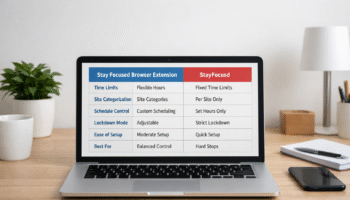
In modern remote work environments, focus tools tend to fall into two broad categories: awareness tools that show where time goes, and enforcement tools that actively limit distraction. Professionals who work primarily in browsers—writers, students, analysts, developers, and remote teams—often cycle through several of these tools before finding one that fits their cognitive rhythm. The stay focused extension sits firmly in the enforcement category, but with enough customization to appeal to users who still want control.
Rather than promising motivation or productivity breakthroughs, the extension focuses on reducing exposure to habitual distractions. This approach reflects how digital distraction actually works today: not as a lack of willpower, but as repeated, low-friction access to tempting sites during moments of mental fatigue.
Table of Contents
What the Stay Focused Extension Does
The Stay Focused extension is designed to limit time spent on distracting websites by creating intentional boundaries within the browser. It works best for people whose work and distractions happen in the same place—tabs, search results, and background browsing.
Instead of tracking behavior passively, the extension intervenes at the moment a limit is reached. This makes it particularly effective during task-heavy workdays where attention is fragmented by notifications, news cycles, and social platforms.
To experience how browser-based focus control can improve your workflow, add Stay Focused to your browser to start limiting distractions and protecting your focus
Core Blocking and Limiting Functions
These core features form the foundation of how the stay focused extension operates. While simple in structure, their effectiveness depends on thoughtful setup and realistic expectations.
• Daily time limits for specific websites
• Full blocking of selected sites during chosen hours
• Automatic lockout once a time quota is exhausted
• Rules applied per site or across groups of sites
In everyday use, this often looks like allowing short, intentional access to social media or entertainment sites, followed by a complete block once the limit is reached. The message displayed is neutral and unobtrusive, which helps avoid guilt-based productivity while still stopping the behavior.
Strict Mode and Commitment-Based Blocking
One of the most distinctive elements of the stay focused extension is its strict mode. This feature intentionally makes it difficult—or impossible—to change settings once activated.
When strict mode is enabled, users may be prevented from:
• Editing time limits
• Disabling the extension
• Uninstalling it temporarily
• Bypassing blocks through settings
This feature is most useful during high-stakes periods such as exam preparation, deadline-driven projects, or deep-focus work sprints. By removing the option to “just adjust the rules,” strict mode reduces decision fatigue and protects focus during cognitively demanding tasks.
That said, strict mode is most effective when used intentionally rather than continuously. Overuse can lead to frustration or avoidance, particularly for users who need flexibility throughout the day.
Scheduled Focus Windows
Unlike rigid all-day blockers, the stay focused extension allows time-based scheduling. This aligns well with modern remote and hybrid work patterns, where productivity often comes in focused blocks rather than a continuous eight-hour stretch.
With scheduled focus windows, users can:
• Block social media during morning deep-work hours
• Allow limited access during lunch breaks
• Reinstate restrictions in the afternoon or evening
This approach mirrors natural energy cycles and supports sustainable focus rather than constant restriction.
How It Differs From Similar Tools
Focus tools vary widely in philosophy and execution. Understanding how the stay focused extension differs from other options helps clarify who it is—and is not—designed for.
Stay Focused vs Time-Tracking Tools
Time-tracking tools emphasize reflection. They show users how time was spent after the fact, often through charts or weekly reports.
The stay focused extension operates differently by intervening in real time. Instead of reporting that two hours were lost to distraction, it stops access the moment a limit is reached. This makes it particularly useful for people who are already aware of their habits but struggle to disengage once a distraction begins.
Stay Focused vs Gentle Focus Applications
Some focus apps rely on soft prompts, reminders, or motivational feedback. These tools are often helpful during burnout recovery or creative exploration, where pressure can be counterproductive.
By contrast, the stay focused extension is behavior-focused rather than emotionally supportive. It does not encourage or reward productivity; it simply reduces access to distractions. This makes it better suited for structured workflows, deadline-oriented roles, and users who already value focus but need firm boundaries.
Browser-Level Control vs Device-Level Control
Another important distinction is scope. The stay focused extension operates entirely within the browser.
This means:
• It works well for browser-based tasks
• It does not restrict mobile apps or system-wide usage
• Switching browsers can bypass restrictions
For many remote workers, this limitation is acceptable because the browser is where both work and distraction primarily occur. However, users seeking full-device control may need complementary tools.
Realistic Feature Scenarios
Understanding how features translate into daily behavior is more useful than listing settings. The following scenarios reflect common use cases.
Scenario 1: Deadline-Driven Writing or Research
Long-form writing and research often involve frequent tab switching. Setting zero-minute allowances for high-distraction sites during focused work blocks prevents derailment without interrupting the task itself.
The block acts as a silent guardrail rather than an interruption, preserving cognitive flow.
Scenario 2: Flexible Remote Schedules
For workers with asynchronous schedules, time windows are often more effective than strict daily limits. Blocking distractions only during personal peak-focus hours allows flexibility while still protecting attention.
Scenario 3: Students and Exam Preparation
Students often benefit from strict mode during exam periods. Locking in focus rules for multiple days reduces constant self-negotiation and helps maintain consistency during intensive study cycles.
Flexibility vs Strictness: Where the Stay Focused Extension Fits
Focus tools generally lean toward either adaptability or enforcement. The stay focused extension attempts to balance both, but its strength clearly lies in enforcement.
Flexibility supports autonomy and experimentation, while strictness supports consistency and habit interruption. The extension favors the latter, making it more effective for users who want consequences built into their systems.
| Feature Dimension | Stay Focused Extension | Gentle Focus Tools |
|---|---|---|
| Customization | High | Medium |
| Ease of override | Low in strict mode | High |
| Behavior enforcement | Strong | Light |
| Emotional tone | Neutral | Encouraging |
| Best suited for | Habit interruption | Awareness and reflection |
This positioning explains why user experiences vary widely. Those seeking firm boundaries often find it effective, while those preferring guidance without restriction may find it too rigid.
[IMAGE: Browser showing blocked website message during work hours, realistic scenario]
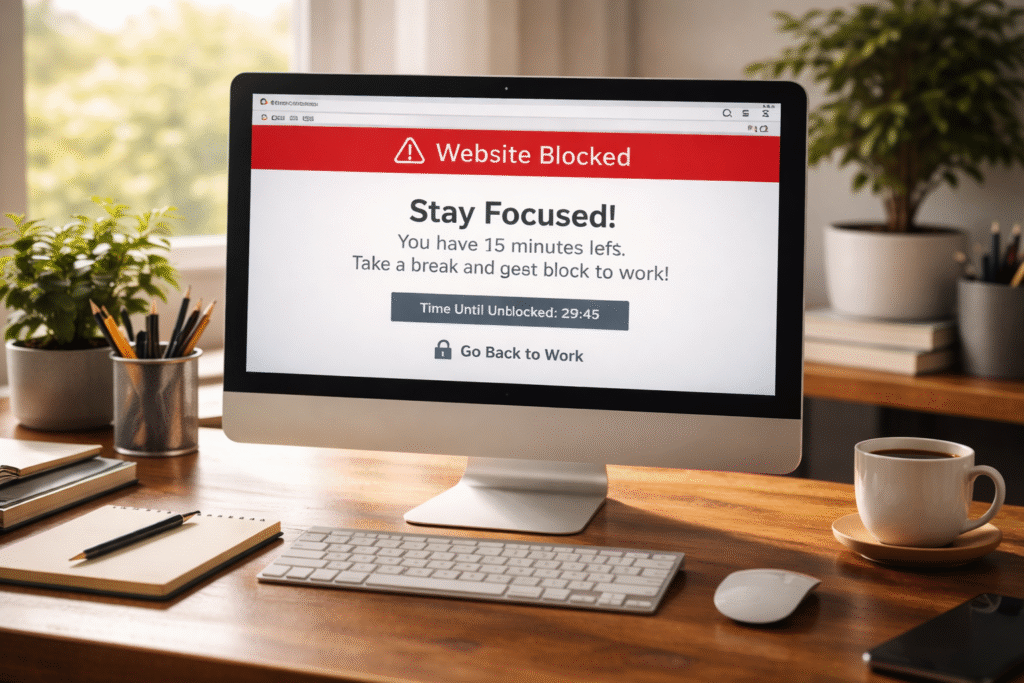
At this stage, it becomes clear that the stay focused extension is neither a universal solution nor an outdated blunt instrument. It is a browser-based boundary tool that works best when aligned with real work patterns and cognitive limits.
Strengths and Limitations for Different Work Styles
Every focus tool reflects assumptions about how people work. The stay focused extension is strongest in environments where tasks are clearly defined and distractions are predictable, but it can feel mismatched in more fluid workflows.
For structured, deadline-driven work, the extension’s strengths are clear. It reduces cognitive load by removing the need to constantly decide whether to keep browsing. Once limits are set, the system handles enforcement quietly in the background, which supports sustained attention during deep work blocks.
However, for roles that rely on exploration—such as creative research, social media management, or trend analysis—the same strictness can become a limitation. Blocking access too aggressively may interrupt legitimate work tasks or force constant rule adjustments, which defeats the purpose of automation.
In short, the extension favors consistency over adaptability. This is an advantage for some work styles and a constraint for others.
Who Should Avoid Overly Strict Focus Tools
Strict focus tools are not universally helpful, and using them at the wrong time can increase stress rather than reduce distraction. People experiencing burnout, cognitive overload, or unstable schedules may find rigid blockers counterproductive.
Those who rely heavily on social platforms for work, collaboration, or community building may also struggle. When a tool blocks both distraction and necessary engagement, users may start working around the system instead of with it.
Additionally, individuals who respond poorly to external control may experience frustration or guilt when blocked. In these cases, awareness-based tools or softer boundaries often support healthier long-term habits than strict enforcement.
Tips for Mindful Use Without Burnout
Using the stay focused extension mindfully means treating it as a support system, not a punishment mechanism. The goal is to protect attention, not eliminate flexibility entirely.
One effective approach is to align restrictions with energy patterns rather than entire days. Blocking distractions only during peak focus hours respects natural cognitive cycles. Allowing intentional breaks also reduces rebound scrolling once restrictions lift.
Another helpful strategy is periodic rule reviews. As workloads and responsibilities change, focus rules should adapt. Static settings applied indefinitely often lead to frustration, while evolving rules maintain relevance and trust in the tool.
Finally, pairing browser-level blocking with offline habits—such as scheduled breaks or task batching—creates a more balanced focus system than relying on one tool alone.
Conclusion
The stay focused extension is a practical tool for reducing browser-based distractions, especially in structured, deadline-oriented work environments. Its strength lies in enforcement and customization, offering firm boundaries for users who want systems that hold them accountable.
At the same time, its strictness can feel limiting for exploratory or emotionally demanding work. Used thoughtfully, it supports mindful productivity rather than rigid control. The key is alignment: when the tool matches the user’s work style, it protects attention without adding pressure. When it doesn’t, flexibility and self-awareness matter more than stricter rules.
FAQ Section
Is the Stay Focused extension suitable for remote work?
The extension works well for remote roles that rely heavily on browser-based tasks such as writing, coding, research, or online learning. It helps create structure in flexible environments by reducing distraction during focus periods. However, roles requiring frequent social media access or rapid context switching may need lighter restrictions to avoid interrupting legitimate work activities.
Can the Stay Focused extension increase stress or burnout?
It can if used too aggressively or without flexibility. Overly strict rules applied for long periods may create frustration or pressure, especially during low-energy phases. Mindful use—such as limiting strict mode to short work sprints and allowing intentional breaks—helps prevent burnout while still supporting focus.
How does Stay Focused compare to Pomodoro timers?
Pomodoro timers focus on time boxing work sessions and breaks, while Stay Focused limits access to distractions. They solve different problems and can complement each other. Pomodoro techniques support rhythm and pacing, whereas Stay Focused reduces temptation. Combining both often creates a more balanced productivity system.
Is it easy to bypass the Stay Focused extension?
In normal mode, settings can be changed easily. In strict mode, bypassing is intentionally difficult. That said, switching browsers or devices can circumvent browser-level tools. This is why the extension works best for users who are committed to respecting their own boundaries rather than looking for loopholes.
Does the Stay Focused extension work on mobile devices?
The extension is primarily browser-based and works best on desktop browsers. It does not control mobile apps or system-wide usage. Users who experience most distractions on smartphones may need additional tools or device-level settings to complement browser restrictions.
Who benefits most from using the Stay Focused extension?
Students, remote workers, and professionals with clear deliverables and predictable distractions tend to benefit most. It is especially helpful during exam periods, project deadlines, or deep-focus work phases where consistent boundaries reduce decision fatigue and support sustained attention.